Hiển thị các bài đăng có nhãn Windows 7. Hiển thị tất cả bài đăng

Hướng dẫn gỡ bỏ crack để active key bản quyền Windows


Cách remove key, reset key đã crack để active key bản quyền
– Có nhiều bạn thắc mắc lỡ sử dụng Windows crack nhưng khi có khóa sản phẩm chính hãng thì không biết làm sao để kích hoạt trở lại vì khi các bạn crack, với một key OEM slp nó sẽ đóng kín trạng thái thay đổi key (không có dòng change product key) điều này khiến bạn sẽ không thể đăng ký key bản quyền?
– Cách làm sau đây sẽ giúp bạn trở lại trạng thái ban đầu day trial và xuất hiện dòng thay đổi key (Change product key)
– Vào Run gõ cmd trong start menu gõ các lệnh sau:
Slmgr -rilc
Slmgr -cpky
Slmgr -upk
(ấn enter sau mỗi lệnh)

Đăng ký với một key trial:
Slmgr -ipk XXXXX-XXXXX-XXXXX-XXXXX-XXXXX
Với XXXX thay bằng các dãy phù hợp các phiên bản sau:
Ultimate – D4F6K-QK3RD-TMVMJ-BBMRX-3MBMV
Professional – HYF8J-CVRMY-CM74G-RPHKF-PW487
Home Premium – RHPQ2-RMFJH-74XYM-BH4JX-XM76F
Home Basic – YGFVB-QTFXQ-3H233-PTWTJ-YRYRV
Starter – 7Q28W-FT9PC-CMMYT-WHMY2-89M6G

PS: các key trên chỉ là key trial các bạn chỉ test thử thôi.

Hướng dẫn thay đổi font mặc định của Windows 7

Bạn cảm thấy nhàm chán với font chữ mặc định của Windows 7 ??? Bài viết dưới dây hướng dẫn bạn thay đổi font chữ mặc định của Windows 7 thành font chữ mà bạn yêu thích :)
Windows 7 sử dụng font Segoe UI làm font mặc định, chúng ta chỉ cần 1 "thủ thuật" nhỏ dưới đây là có thể tạo nên sự mới mẻ cho giao diện Windows của bạn
Lưu ý : font chữ yêu thích mà bạn định thay PHẢI là font UNICODE để nó hiển thị tiếng Việt ^,..,^
Bắt tay vào làm nào, trước tiên mở Notepad lên và paste đoạn code dưới đây vào
Mã:
Windows Registry Editor Version 5.00
 
[HKEY_LOCAL_MACHINE\SOFTWARE\Microsoft\Windows NT\CurrentVersion\Fonts]
"Segoe UI (TrueType)"=""
"Segoe UI Bold (TrueType)"=""
"Segoe UI Italic (TrueType)"=""
"Segoe UI Bold Italic (TrueType)"=""
"Segoe UI Semibold (TrueType)"=""
"Segoe UI Light (TrueType)"=""
"Segoe UI Symbol (TrueType)"=""
 
[HKEY_LOCAL_MACHINE\SOFTWARE\Microsoft\Windows NT\CurrentVersion\FontSubstitutes]
"Segoe UI"="Tên font chữ mà bạn yêu thích"
Trong đó "Tên font chữ mà bạn yêu thích" chính là font chữ của bạn Đàcài đặt vào Windows, tên của nó bạn PHẢI tìm trong thư mục Fonts.
Lưu file với tên ChangeFont.reg và thực thi nó. Log off lại máy và tận hưởng thành quả :)
Nếu muốn trở về font Segoe UI mặc định thì thay đoạn code dưới dây vào
Mã:
Windows Registry Editor Version 5.00
 
[HKEY_LOCAL_MACHINE\SOFTWARE\Microsoft\Windows NT\CurrentVersion\Fonts]
"Segoe UI (TrueType)"="segoeui.ttf"
"Segoe UI Bold (TrueType)"="segoeuib.ttf"
"Segoe UI Italic (TrueType)"="segoeuii.ttf"
"Segoe UI Bold Italic (TrueType)"="segoeuiz.ttf"
"Segoe UI Semibold (TrueType)"="seguisb.ttf"
"Segoe UI Light (TrueType)"="segoeuil.ttf"
"Segoe UI Symbol (TrueType)"="seguisym.ttf"
 
[HKEY_LOCAL_MACHINE\SOFTWARE\Microsoft\Windows NT\CurrentVersion\FontSubstitutes]
"Segoe UI"=-

Wandriver 6.5 Tiếng Anh + Tiếng Việt - Bộ Driver Tự Động, Đầy Đủ Cho Windows

Tiện Ích Máy Tính đã giới thiệu đến các bạn bộ Wandriver - Easy DriverPack 6.5 mới nhất đến thời điểm hiện tại. Tuy nhiên do là bản nguyên gốc từ Wandriver nên ngôn ngữ Trung Quốc nhìn khá khó chịu và khó sử dụng. Đã bổ sung bản cập nhật mới nhất hỗ trợ tốt cho Windows 10.
Để đáp ứng nhu cầu của các bạn, TIMT đã Anh/Việt hóa bộ Driver này dựa trên công cụ của DanielDac. Có nhiều bạn thắc mắc khi chạy driver thông tin ghi trên phần mềm là 6.2, xin trả lời là: Đây chỉ là phiên bản phần mềm hỗ trợ ngôn ngữ thôi nhé, bộ driver tích hợp trong đó vẫn là 6.5 mới nhất.
Bản tiếng Anh
Bản Tiếng Việt
Nếu máy tính của bạn vừa mới cài lại Win và bị thiếu nhiều Driver hoặc muốn làm một bản Ghost đa cấu hình thì Wandriver 6.5 Tiếng Anh/Tiếng Việt là một lựa chọn hoàn hảo cho bạn. Được cập nhật các driver mới nhất cho nhiều dòng máy khác nhau từ cũ đến mới, hỗ trợ các card đồ họa mới nhất. Chỉ cần tải bộ phù hợp về máy, nó sẽ tự động tìm kiếm những driver còn thiếu và tự động cài đặt cho bạn. Rất tiện lợi và nhanh chóng

Tải Về Bộ Wandriver 6.5 Nguyên Gốc
Các bạn chọn một trong các bộ phù hợp với hệ điều hành của mình nhé
Bản Ngôn Ngữ Tiếng Việt
Link tốc độ cao
taixuong
Link dự phòng Fshare
taixuong
Link dự phòng 4Share
taixuong
Link dự phòng Tenlua
taixuong

Bản Ngôn Ngữ Tiếng Anh
Link tốc độ cao
taixuong
Link dự phòng Fshare
taixuong
Bản All In One
taixuong


Tải Về Bộ Wandriver 6.5 Cập Nhật Tháng 10 - 2015 Mới Nhất
Đây là bản cập nhật mới nhất cho tất cả các hệ điều hành từ Windows XP - 10. Các bạn nên tải bộ này về để máy nhận được hết Driver nhé !
Các bạn chọn một trong các bộ phù hợp với hệ điều hành của mình nhé
Bản Ngôn Ngữ Tiếng Việt
Link tốc độ cao
taixuong
Link dự phòng Fshare (Đang Upload)
taixuong

Bản Ngôn Ngữ Tiếng Anh
Link tốc độ cao
taixuong
Link dự phòng Fshare (Đang Upload)
taixuong


Hướng Dẫn Sử Dụng
Vì giao diện tiếng Việt nên dùng khá đơn giản.
Các bạn chọn bộ Driver phù hợp với hệ điều hành tải về và giải nén sau đó chạy File Wandrv6.exe
Nhấn vào Start để bắt đầu cài đặt
Sau khi quá trình hoàn tất, bạn Restart máy là OK
Đối với bản Tiếng Việt cũng tương tự nhé !
Vậy là xong, đã có đủ Driver cho máy mà không mất quá nhiều thời gian !

Luxury Iconpack by Khatmau_sr - Thay đổi giao diện windows 7 thật đẹp

Mọi người vẫn thường biết tới Khatmau_sr và cái tên Luxury qua các bản ghost, hôm nay mình chia sẻ với các bạn bộ Luxury Megapack installer do chính tay mình làm. Ghost có cái hay là tiện lợi, chi tiết hơn iconpack nhưng nó lại hay gặp những lỗi nhỏ và nặng hơn iconpack installer rất nhiều. Gói giao diện này cài đặt và gỡ bỏ rất nhanh chóng, tiện lợi. Chỉ trong vài phút toàn bộ giao diện Windows sẽ được đổi thay hoàn toàn, khoác 1 bộ áo mới cực đẹp. Sau 1 số bộ Luxury Iconpack đã phát hành, cuối cùng Khatmau đã làm bộ Luxury Megapack này. Ưu điểm của nó là giao diện đẹp, dễ sử dụng, thay đổi giao diện windows tự động chỉ với 1 Click.

Chân thành cảm ơn Robi, Fiazi, alexgal, trinhbaphap, anh em KtvOnline...đã giúp đỡ Khatmau_sr hoàn thiện sản phẩm.

[​IMG]

  • Bạn phải tắt UAC, Antivirus trước khi chạy bộ Megapack này, nếu không sẽ lỗi khi chạy Luxury Iconpack.
  • Click vào lần lượt 3 dòng "Install..." Khi các tiến trình làm việc xong bạn hãy khởi động lại máy để xem được toàn bộ thay đổi nhé!
  • Khi nào chán muốn gỡ bỏ thì cứ gỡ bỏ như 1 phần mềm bình thường nhé!
[​IMG]

:sh:
Dưới đây là những hình ảnh sau khi sử dụng Luxury Megapack
[​IMG]


Ngoài ra còn đính kèm thêm 1 số tool giúp thay đổi Theme winrar, Themes trong suốt, gadget...
Hãy tải về khám phá và tận hưởng vẻ đẹp Luxury này nhé!

:dl:
http://4share.vn/f/3407000405070007/LuxuryMegapack.rar
https://www.mediafire.com/folder/bda0aaflrn93m//LuxuryMegapack

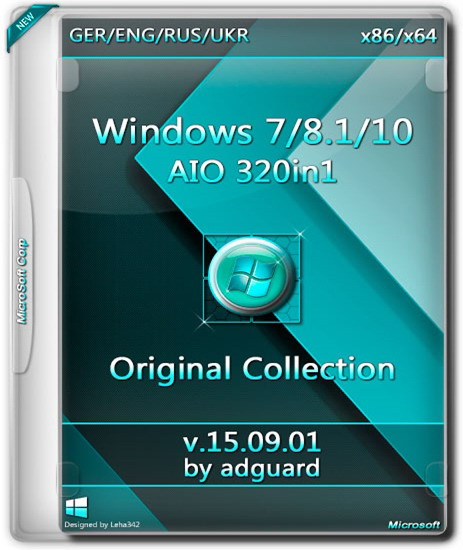
Windows 7-8.1-10 AIO -320in1- by adguard - Bộ cài cực khủng


The most popular operating system is always at hand!
The assembly is designed for those who do not like the build with updates from Microsoft. Recently, Microsoft began adding telemetry with distributions that are not very good. Now the assembly. It is based on the original image from the MSDN integrated Russian, Ukrainian, English, German and included Net Framework 3.5 (includes .NET 2.0 and 3.0).

Main features:

  • Integrated Language Packs: Russian, Ukrainian, English, German.
  • Updates are not integrated.
  • Systems were in audit mode.
  • All the changes made by standard means of Microsoft.
  • Integrated NET Framework 3.5 (includes .NET 2.0 and 3.0) systems Windows 8.1 and Windows 10.
  • After installation on the system disk will be created a folder with additional material. Folder "Activators" contains several different activators for the system.
  • This assembly has passed rigorous testing and checked for errors and bugs.

[​IMG]

Windows 7 SP1 -104in1-:

  • Windows 7 Starter (32-bit) - Russian, Ukrainian, English, German
  • Windows 7 Starter N (32-bit) - Russian, Ukrainian, English, German
  • Windows 7 Home Basic (32-bit) - Russian, Ukrainian, English, German
  • Windows 7 Home Basic (64-bit) - Russian, Ukrainian, English, German
  • Windows 7 Home Basic N (32-bit) - Russian, Ukrainian, English, German
  • Windows 7 Home Basic N (64-bit) - Russian, Ukrainian, English, German
  • Windows 7 Home Premium (32-bit) - Russian, Ukrainian, English, German
  • Windows 7 Home Premium (64-bit) - Russian, Ukrainian, English, German
  • Windows 7 Home Premium N (32-bit) - Russian, Ukrainian, English, German
  • Windows 7 Home Premium N (64-bit) - Russian, Ukrainian, English, German
  • Windows 7 Professional (32-bit) - Russian, Ukrainian, English, German
  • Windows 7 Professional (64-bit) - Russian, Ukrainian, English, German
  • Windows 7 Professional N (32-bit) - Russian, Ukrainian, English, German
  • Windows 7 Professional N (64-bit) - Russian, Ukrainian, English, German
  • Windows 7 Professional VL (32-bit) - Russian, Ukrainian, English, German
  • Windows 7 Professional VL (64-bit) - Russian, Ukrainian, English, German
  • Windows 7 Professional N VL (32-bit) - Russian, Ukrainian, English, German
  • Windows 7 Professional N VL (64-bit) - Russian, Ukrainian, English, German
  • Windows 7 Ultimate (32-bit) - Russian, Ukrainian, English, German
  • Windows 7 Ultimate (64-bit) - Russian, Ukrainian, English, German
  • Windows 7 Ultimate N (32-bit) - Russian, Ukrainian, English, German
  • Windows 7 Ultimate N (64-bit) - Russian, Ukrainian, English, German
  • Windows 7, Enterprise (32-bit) - Russian, Ukrainian, English, German
  • Windows 7, Enterprise (64-bit) - Russian, Ukrainian, English, German
  • Windows 7 Enterprise N (32-bit) - Russian, Ukrainian, English, German
  • Windows 7 Enterprise N (64-bit) - Russian, Ukrainian, English, German
[​IMG]

Ingredients version Windows 8.1 with Update 3 -80in1-:

  • Windows 8.1 with Update 3 - 80in1
  • Composition versions:
  • Windows 8.1 Single Language (32-bit) - Russian, Ukrainian, English, German
  • Windows 8.1 Single Language (64-bit) - Russian, Ukrainian, English, German
  • Windows 8.1 Core (32-bit) - Russian, Ukrainian, English, German
  • Windows 8.1 Core (64-bit) - Russian, Ukrainian, English, German
  • Windows 8.1 Core N (32-bit) - Russian, Ukrainian, English, German
  • Windows 8.1 Core N (64-bit) - Russian, Ukrainian, English, German
  • Windows 8.1 Professional (32-bit) - Russian, Ukrainian, English, German
  • Windows 8.1 Professional (64-bit) - Russian, Ukrainian, English, German
  • Windows 8.1 Professional N (32-bit) - Russian, Ukrainian, English, German
  • Windows 8.1 Professional N (64-bit) - Russian, Ukrainian, English, German
  • Windows 8.1 Professional VL (32-bit) - Russian, Ukrainian, English, German
  • Windows 8.1 Professional VL (64-bit) - Russian, Ukrainian, English, German
  • Windows 8.1 Professional N VL (32-bit) - Russian, Ukrainian, English, German
  • Windows 8.1 Professional N VL (64-bit) - Russian, Ukrainian, English, German
  • Windows 8.1 Professional with Media Center (32-bit) - Russian, Ukrainian, English, German
  • Windows 8.1 Professional with Media Center (64-bit) - Russian, Ukrainian, English, German
  • Windows 8.1 Enterprise (32-bit) - Russian, Ukrainian, English, German
  • Windows 8.1 Enterprise (64-bit) - Russian, Ukrainian, English, German
  • Windows 8.1 Enterprise N (32-bit) - Russian, Ukrainian, English, German
  • Windows 8.1 Enterprise N (64-bit) - Russian, Ukrainian, English, German
Ingredients version Windows Embedded 8.1 with Update 3 -16in1-:

  • Windows Embedded 8.1 Industry Professional (32-bit) - Russian, Ukrainian, English, German
  • Windows Embedded 8.1 Industry Professional (64-bit) - Russian, Ukrainian, English, German
  • Windows Embedded 8.1 Industry Enterprise (32-bit) - Russian, Ukrainian, English, German
  • Windows Embedded 8.1 Industry Enterprise (64-bit) - Russian, Ukrainian, English, German

[​IMG]

The composition of the version of Windows 10 build 10240 -120in1-:

  • Windows 10 Home Single Language (32-bit) - Russian, Ukrainian, English, German
  • Windows 10 Home Single Language (64-bit) - Russian, Ukrainian, English, German
  • Windows 10 Home (32-bit) - Russian, Ukrainian, English, German
  • Windows 10 Home (64-bit) - Russian, Ukrainian, English, German
  • Windows 10 Home N (32-bit) - Russian, Ukrainian, English, German
  • Windows 10 Home N (64-bit) - Russian, Ukrainian, English, German
  • Windows 10 Pro (32-bit) - Russian, Ukrainian, English, German
  • Windows 10 Pro (64-bit) - Russian, Ukrainian, English, German
  • Windows 10 Pro N (32-bit) - Russian, Ukrainian, English, German
  • Windows 10 Pro N (64-bit) - Russian, Ukrainian, English, German
  • Windows 10 Pro VL (32-bit) - Russian, Ukrainian, English, German
  • Windows 10 Pro VL (64-bit) - Russian, Ukrainian, English, German
  • Windows 10 Pro N VL (32-bit) - Russian, Ukrainian, English, German
  • Windows 10 Pro N VL (64-bit) - Russian, Ukrainian, English, German
  • Windows 10 Education (32-bit) - Russian, Ukrainian, English, German
  • Windows 10 Education (64-bit) - Russian, Ukrainian, English, German
  • Windows 10 Education N (32-bit) - Russian, Ukrainian, English, German
  • Windows 10 Education N (64-bit) - Russian, Ukrainian, English, German
  • Windows 10 Education VL (32-bit) - Russian, Ukrainian, English, German
  • Windows 10 Education VL (64-bit) - Russian, Ukrainian, English, German
  • Windows 10 Education N VL (32-bit) - Russian, Ukrainian, English, German
  • Windows 10 Education N VL (64-bit) - Russian, Ukrainian, English, German
  • Windows 10 Enterprise (32-bit) - Russian, Ukrainian, English, German
  • Windows 10 Enterprise (64-bit) - Russian, Ukrainian, English, German
  • Windows 10 Enterprise N (32-bit) - Russian, Ukrainian, English, German
  • Windows 10 Enterprise N (64-bit) - Russian, Ukrainian, English, German
  • Windows 2015 Enterprise 10 LTSB (32-bit) - Russian, Ukrainian, English, German
  • Windows 2015 Enterprise 10 LTSB (64-bit) - Russian, Ukrainian, English, German
  • Windows 10 Enterprise N 2015 LTSB (32-bit) - Russian, Ukrainian, English, German
  • Windows 10 Enterprise N 2015 LTSB (64-bit) - Russian, Ukrainian, English, German
System requirements:

  • Processor: 1 GHz or more
  • RAM: 2 GB
  • Free hard drive space: 20 GB
  • Graphics card: graphics device Microsoft DirectX 9 or later
  • Additional requirements to use certain features
  • To use the touch features require tablet or monitor that supports multitouch
  • To access the Windows Store to download and run applications that require an active Internet connection and a screen resolution of at least 1024x768 pixels
  • To bind the application requires a screen resolution of at least 1366x768
Checksums:
CRC32: D2DDF135
MD5: 571ECCCE5DCE9B4E022A93A67A745A20
SHA-1: 750EAE61A48C8F1134FD53212B6A19AA5572F802
[​IMG]
[​IMG]
[​IMG]
[​IMG]
[​IMG]
[​IMG]
[​IMG]
[​IMG]
[​IMG]
[​IMG]